A concept delivery app for late-night cravings. Asian street food, 10 PM to 5 AM.
NITEBITE: Late-night food delivery app

UI/UX Design
Brand Identity
Motion Design
ROLE
Mobile app, concept
PLATFORM
One Semester
TIMELINE
Figma
Adobe Illustrator
Adobe After Effects
TOOLS
A delivery app that only opens at night, from 10 PM to 5 AM.
01
The menu splits two ways: Spicy or Sweet.
02
A dark interface where yellow is saved for actions.
03
A full brand system, including Zing, a flame mascot.
04
At a Glance
The Challenge
After restaurants close, delivery choices shrink to generic fast food. For Asian food lovers, the dishes they actually want are rarely available late.
Spicy and sweet cravings tend to hit at night. That is when good food is hardest to find.
A night order also happens in a dark room, often when the person is tired or mid-game. The app has to be easy on the eyes and quick to decide in.
THE PROBLEM
WHY NIGHT
Main Objectives
An app for orders between 10 PM and 5 AM, with an interface that feels like the night.
Create a late-night experience
Type, scale and contrast hold up in VR.
Simplify
food ordering
Users know what to do next and where to find help.
Build a memorable brand
The UI supports the environment, not the other way around.
Make heat easy to read
The Design Process
Discover
Define
Ideate
Design
Set the audience, persona, and core flow.
Sketch screens and brand directions.
Study delivery apps and late-night eating habits.
Build the interface, brand, and Zing.
Understanding late-night eaters
I started with a competitive analysis of existing delivery apps and desk research on late-night eating habits. The gap was clear: late-night options are mostly fast food, and Asian street food is hard to find after hours.
The core audience is Asian food lovers who are awake late: gamers, students, night-shift workers, and people heading home from a night out. They want bold flavor, fast delivery, and as little effort as possible.
Convenience first
Late at night, users want ordering to take as little effort as possible.
LED TO
A short flow from craving to checkout, with fewer screens.
DISCOVER
Convenience first
Late at night, users want ordering to take as little effort as possible.
LED TO
A short flow from craving to checkout, with fewer screens.
Convenience first
Late at night, users want ordering to take as little effort as possible.
LED TO
A short flow from craving to checkout, with fewer screens.
Convenience first
Late at night, users want ordering to take as little effort as possible.
LED TO
A short flow from craving to checkout, with fewer screens.
Defining the user and the flow
I built three personas from the research, then chose one as the primary user. Designing for one person kept every screen focused. Then I mapped the shortest path from craving to delivery.
DEFINE

Primary persona
Motivations, habits, and pain points across the ordering journey.
DECIDE
BROWSE
ORDER
ARRIVE
Feeling hungry?
Choose a craving: Spicy or Sweet
01
02
Discover food
03
Customize the meal
04
Go to cart
05
Place order
06
Track order
07
Enjoy the midnight feast
08
User flow
Eight steps from craving to food. The first real decision is a mood, not a menu.
From wireframe to final
I built three personas from the research, then chose one as the primary user. Designing for one person kept every screen focused. Then I mapped the shortest path from craving to delivery.
IDEATE

Wireframe

The craving choice moved onto the home screen
The wireframe gave Spicy or Sweet its own screen with two large tiles. In the final, it became a toggle on the home screen. One less screen between opening the app and seeing food.
CRAVING CHOICE
Final

Wireframe

One grid split into two views
The wireframe used a grid for every menu. In the final, the grid stays on the home screen for discovery. Once a user picks a mood, the full menu becomes a list with a photo, price, and a one-tap add button, so it is faster to compare and order.
MENU
Final

Wireframe
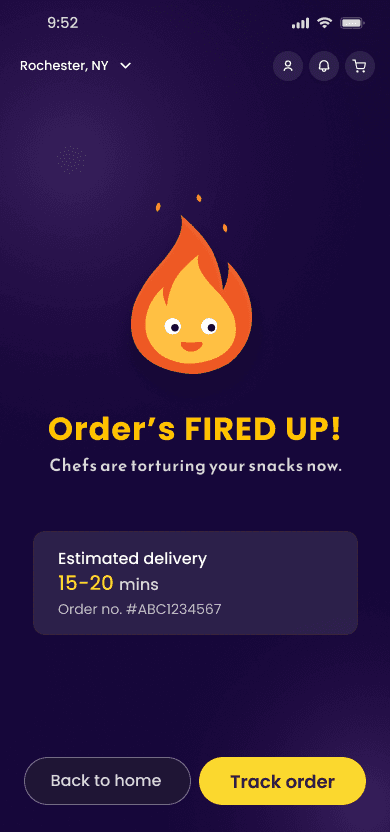
A placeholder circle became Zing
The empty circle on the confirmation screen became the mascot. Waiting for food turned into a brand moment.
CONFIRMATION
Final
Designing the interface system
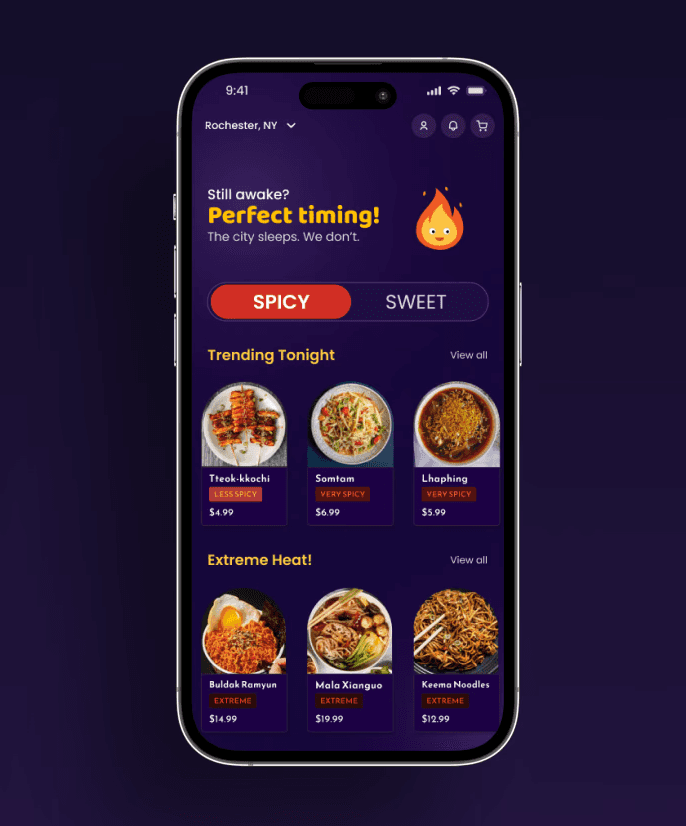
Spicy and sweet are the cravings that hit hardest at night, so the menu opens on that choice. A tired user picks a mood, not a cuisine. A segmented control keeps both options visible and one tap apart. Spicy is red and Sweet is blue, so the active mood reads at a glance.
DESIGN

MENU TOGGLE
Two moods replace a long category list
Each dish carries a color-coded spice label. Users new to a cuisine can judge heat at a glance and order with confidence.

SPICE LABELS
Heat is readable before you open a dish
Two card styles split the job. Large cards with food photography invite browsing. Compact cards make it quick to compare and add to cart.
CARDS
Large cards to discover, compact cards to decide


Yellow is saved for primary actions. On a deep purple screen, the next step is always the brightest thing in view.
BUTTONS
Yellow means act


Status tags carry an order from placed to delivered. The same tags appear in checkout and tracking, so the user learns them once.
STATUS TAGS
Every order shows where it is

Dark by default
The interface is built on deep purple. It stays comfortable in a dark room and fits the nightlife setting.
One choice to start
Spicy or Sweet is the first decision, matching the cravings people have at night. It asks less of a tired brain than a grid of cuisines.
Heat at a glance
Spice labels answer the most common question about street food before the user asks it.
Built for night hours
The service runs from 10 PM to 5 AM. The whole brand promises that availability.
Designing for 2AM
DESIGN
Friendly type
The service runs from 10 PM to 5 AM. The whole brand promises that availability.
Visual Identity
DESIGN
The brand draws on neon city lights, street food, and nightlife. The logo hides bite marks and crumbs in rounded letterforms. Zing, a flame mascot, stands for the heat in the food.


Logo
Bite marks and crumbs in rounded type.
Color and Type
Deep purple for night. Yellow for action. Red and blue mark Spicy and Sweet. Poppins keeps the type round and friendly.

Character
Zing, the flame mascot, drawn for the interface.
Ordering at night is a small reward. Zing makes that moment feel warm. It greets users on the home screen and celebrates every order on confirmation.
WHY A MASCOT
Motion
Opening animation for NiteBite
Final Experience

Highlights
Sign in: a short entry point with social sign-in.
Discover: pick Spicy or Sweet on the home screen, then browse by photo.
Dish detail: spice level and base choice before adding to cart.
Checkout: address, order, and payment on one screen.
Tracking: a live map and status timeline until the food arrives.
Reflection
A niche audience sharpens every decision. Knowing the user was hungry, tired, and awake at 2AM is why the menu starts with one simple choice.
Brand should work inside the interface. Yellow became the action color, and red and blue became Spicy and Sweet. The identity guides interaction instead of decorating it.
Small details make an app memorable. Zing on the confirmation screen and a line like "Order's fired up" give the app more personality than any banner could.
What I learned
Run usability testing with late-night users to validate the ordering flow.
Design the edges of the night: what users see near closing time, and a fast reorder for regulars.
Bring Zing into more of the app through motion.
What I'd do next
